
The Burning Bridges AI Viral Video Trend Explained: Why It Broke the Internet
From Drake’s chandelier ballroom scene to billions of social views. We explore why the Burning Bridges AI video template became the #1 viral meme format of 2026.
 Burning Bridges AI Team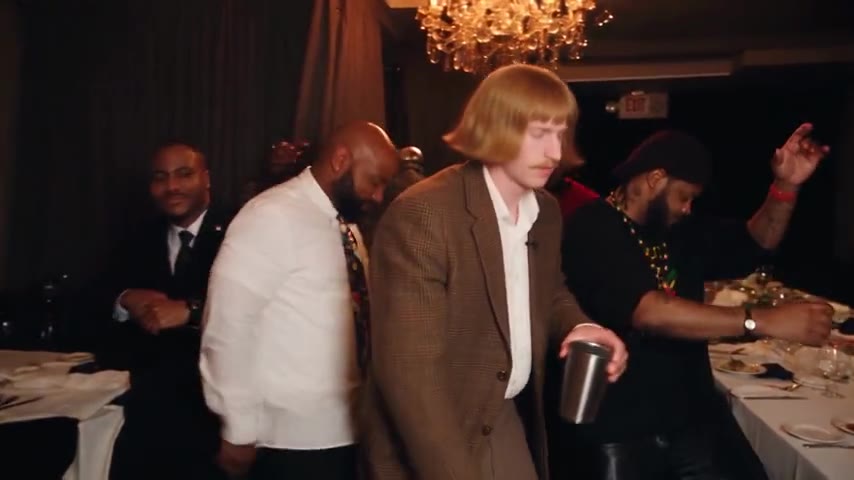
The Burning Bridges AI trend has dominated social feeds across TikTok, Instagram Reels, and YouTube Shorts, accumulating over 1.2 billion views in just a few months. From everyday creators to high-profile influencers, everyone is inserting themselves into an extravagant afterparty.
Why did this specific music video scene spark such an explosive digital phenomenon? Here is the cultural and technical breakdown.
The Origin: Drake's "Burning Bridges" Music Video
On May 15, 2026, Drake premiered the official cinematic music video for Burning Bridges. At approximately 2 minutes and 37 seconds, the visual abruptly cuts away from a moody city exterior to an opulent, gold-lit ballroom drenched in the glow of massive crystal chandeliers.
Drake steps forward wearing luxury evening attire, holding a polished silver cocktail cup. With effortless charisma, he looks directly into the moving handheld camera, mouths the viral lyric "Where she at?", raises his drink in a toast, and turns to acknowledge a cheering crowd of stylish partygoers.
Within 48 hours of release, creators on social media isolated this 15-second sequence and paired it with the beat drop, turning it into the signature "entrance of the year."
Why This Scene Is the "Golden Ratio" for AI Video
Not every music video clip goes viral as an AI template. The Burning Bridges scene possesses an ideal combination of visual and mathematical traits that make AI diffusion models shine:
1. Warm Amber Chandelier Lighting
Traditional AI face-swapping often fails because harsh white studio lighting exposes unnatural boundary seams around the neck and jawline. In contrast, the warm amber glow of crystal chandeliers acts as a natural diffusion filter, allowing neural networks to blend skin tones, highlights, and shadow gradients smoothly.
2. High-Contrast Character Movement
The camera pushes forward on a steady track while the crowd moves sideways. This directional separation gives the AI clean segmentation masks, keeping the protagonist sharp while rendering realistic background motion blur.
3. Strict, Rhythm-Locked Choreography
The video's choreography aligns strictly with the musical beats:
- 0.0s – 1.8s: Confident forward stride through parting guests.
- 2.3s: Sudden sharp hand flick toward the lens on the heavy drum kick.
- 4.5s: Lifting the silver cocktail cup to eye level in a victory toast.
- 9.0s – 12.0s: Celebrating with the crowd.
This predictability means audiences instantly recognize the format even before noticing whose face is substituted into the lead role.
The Comedy of Contrast: Why the Meme Spread
While seeing yourself as a VIP hip-hop artist is satisfying, the trend achieved true virality through comedic contrast. Creators quickly realized that the format becomes exponentially funnier when you replace the swaggering party host with characters who would never normally be in a luxury VIP club:
- The Chemistry Teacher: A tired science teacher in safety goggles waving an Erlenmeyer flask instead of champagne.
- The Retro Office Coder: A 90s sysadmin walking past flickering CRT monitors in a beige cubicle.
- The Cute Animal: A calm raccoon or fluffy dog surrounded by clapping humans.
- Historical Figures: Medieval knights in plate armor or Victorian royalty bumping fists with modern partygoers.
The sharper the disconnect between Drake's ultra-cool lifestyle and the subject's everyday persona, the higher the share rate.
The Evolution of Generation Tools
Early participants had to download raw MP4 clips, configure ComfyUI, manually mask face bounding boxes, and spend hours troubleshooting frame jitter.
Today, specialized services like the Burning Bridges AI Video Generator have streamlined the process into a single photo upload. By applying dedicated motion priors and latent face restoration, anyone can create studio-quality renders directly in their browser.
Want to learn how to produce your own clip? Read our Step-by-Step Creation Guide or check out our Free Template & Prompt Pack.